If you're comparing Aiface Swap, Higgsfield, and Remaker, here's the honest short version: they're not really competing on the same terms. Aiface Swap is the frictionless free option — no sign-up, no watermark, photo and video. Higgsfield makes stunning skin texture but it's a sprawling AI platform, not a face-swap tool, and it wants a login. Remaker is arguably the most natural-looking of the free web swappers, right up until you notice the free output is low-res. I've dug through hands-on tests and community threads to sort out which one actually fits which job.
Key takeaways
- Aiface Swap wins on friction. No account, no watermark, 3 swaps an hour, and it handles photo, video, and GIF — the closest thing to "just do the swap" without a paywall or a sign-up wall.
- Higgsfield has the best skin texture but the worst likeness consistency. Reviewers love the detail it renders, then watch it produce a face that "doesn't look anything like me." It's also a broad generative platform, not a dedicated swapper.
- Remaker looks the most natural of the free web tools — at low resolution. The free tier is genuinely good-looking but soft; HD is locked behind a paid VIP tier, and video needs an upgrade.
- The source image matters more than the brand. Many free web swappers quietly share one aging engine, so a clean, well-lit reference face beats brand-hopping every time.
At a glance
| Aiface Swap | Higgsfield | Remaker AI | |
|---|---|---|---|
| Free tier | 3 swaps/hour | Credit/subscription platform | 30 free credits |
| Sign-up | No | Yes | Yes (for credits) |
| Watermark (free) | None ("zero watermarks") | Not stated | Not stated |
| Video | Yes (+ GIF) | Via broad gen | Yes (paid plan) |
| Quality verdict | Clean, instant, no gate | Top-notch texture, shaky likeness | Most natural free swap, but low-res |
| Price | Free; API for volume | Paid credits/subscription | HD locked to paid VIP |
Now let's get into where each one earns — or loses — its spot.
Aiface Swap: frictionless and genuinely free
The reason Aiface Swap keeps landing at the top of my list isn't a single killer feature — it's the absence of friction. You don't create an account. You don't wait for a confirmation email. You don't get a watermark stamped across your result or a "sign up to download" gate at the finish line. You upload, you swap, you save. It runs photo, video, and GIF, with automatic face detection, and free users get 3 swaps per hour — enough to iterate on a single image or knock out a short clip without hitting a wall.
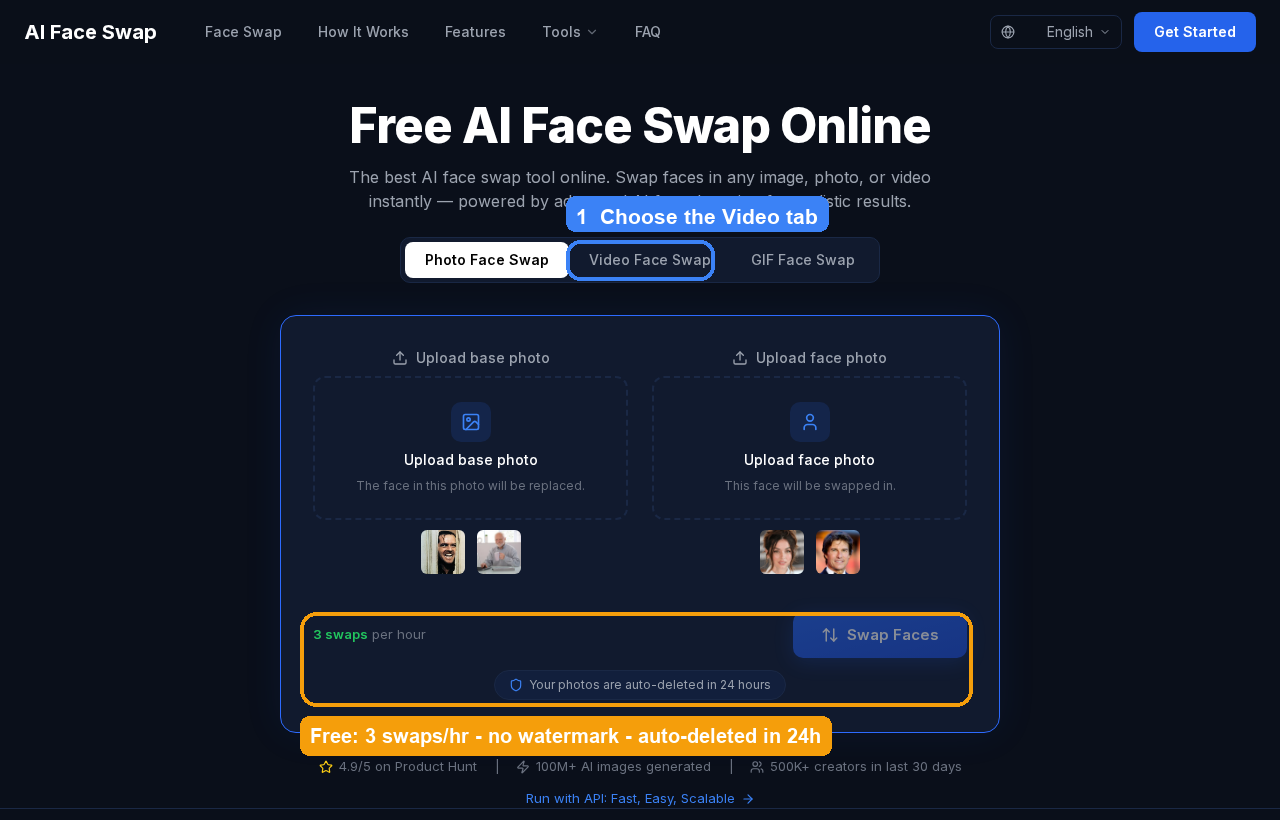
That "no watermark, no login" combination sounds minor until you've used the alternatives. In a broad round-up of free tools, plenty of them either slap a watermark on the output, compress it to mush, or make you register before you can even see the result — and a few do all three, then still ask you to upgrade to remove the stamp. Aiface Swap skips all of that. Uploaded photos are auto-deleted after 24 hours, which matters if you're feeding it your own face, and there's an API if you need to run volume rather than one-offs. It carries a 4.9/5 rating on Product Hunt and claims 100M+ images generated across 500K+ creators, which — grain of salt on any vendor number — at least tells you it's not a weekend project that'll vanish.
Is it the single most photorealistic engine on the planet? No — and I'll be honest about that below, because for most web swappers the engine isn't really the differentiator. What Aiface Swap wins on is that it removes every reason not to try, and it does the two things most people actually want (a clean photo swap and a quick video swap) without asking for anything in return. If you want more options in this lane, our roundup of the best free AI face swap tools breaks down where each one gates you. And if your project is really about generating AI video from scratch rather than swapping a face into existing footage, that's a different tool entirely — something like Kyncept is built for that side of the work.
Higgsfield: gorgeous skin texture, but it's a platform, not a swapper
Higgsfield is the one people bring up when they want "the realistic one," and the praise is earned in exactly one dimension. In a hands-on comparison test, the reviewer's reaction to its output was blunt: the level of detail Higgsfield adds to the skin texture is "really, really top-notch". If you're judging on pores, micro-shadows, and that not-plasticky finish, Higgsfield is legitimately impressive.
Here's the catch, and it's a big one: in the same test, the result "doesn't look anything like me… botched this one." That's the recurring Higgsfield story — beautiful texture wrapped around a face that isn't quite the right face. Great skin, wrong person. For a face swap, likeness is the whole job, so top-tier texture on an inconsistent identity is a strange trade.
The other thing to be clear-eyed about: Higgsfield isn't a face-swap product. It's a broad AI image and video platform with no dedicated face-swap page, running on a credit/subscription model that requires an account. You're signing into a general-purpose generation suite and steering it toward a swap, not opening a tool built for the task. That's fine if you're already living inside Higgsfield for other generative work and a swap is an occasional side quest. But if the swap is the point, you're paying — in login, in credits, and in likeness reliability — for texture quality you may not even get to keep consistently.
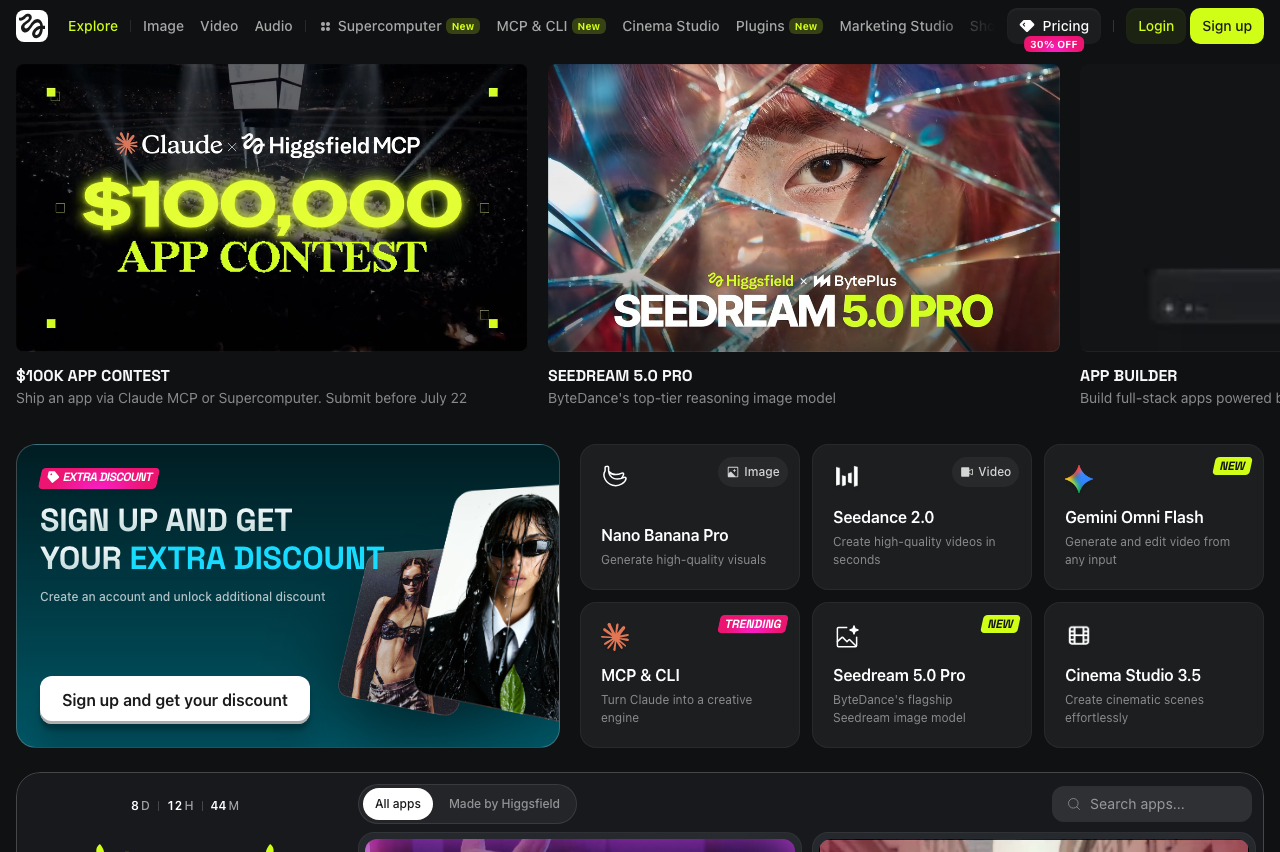 This is the Higgsfield home screen — a full creative suite of apps and models. There's no face-swap tool; you steer a general generator toward a swap.
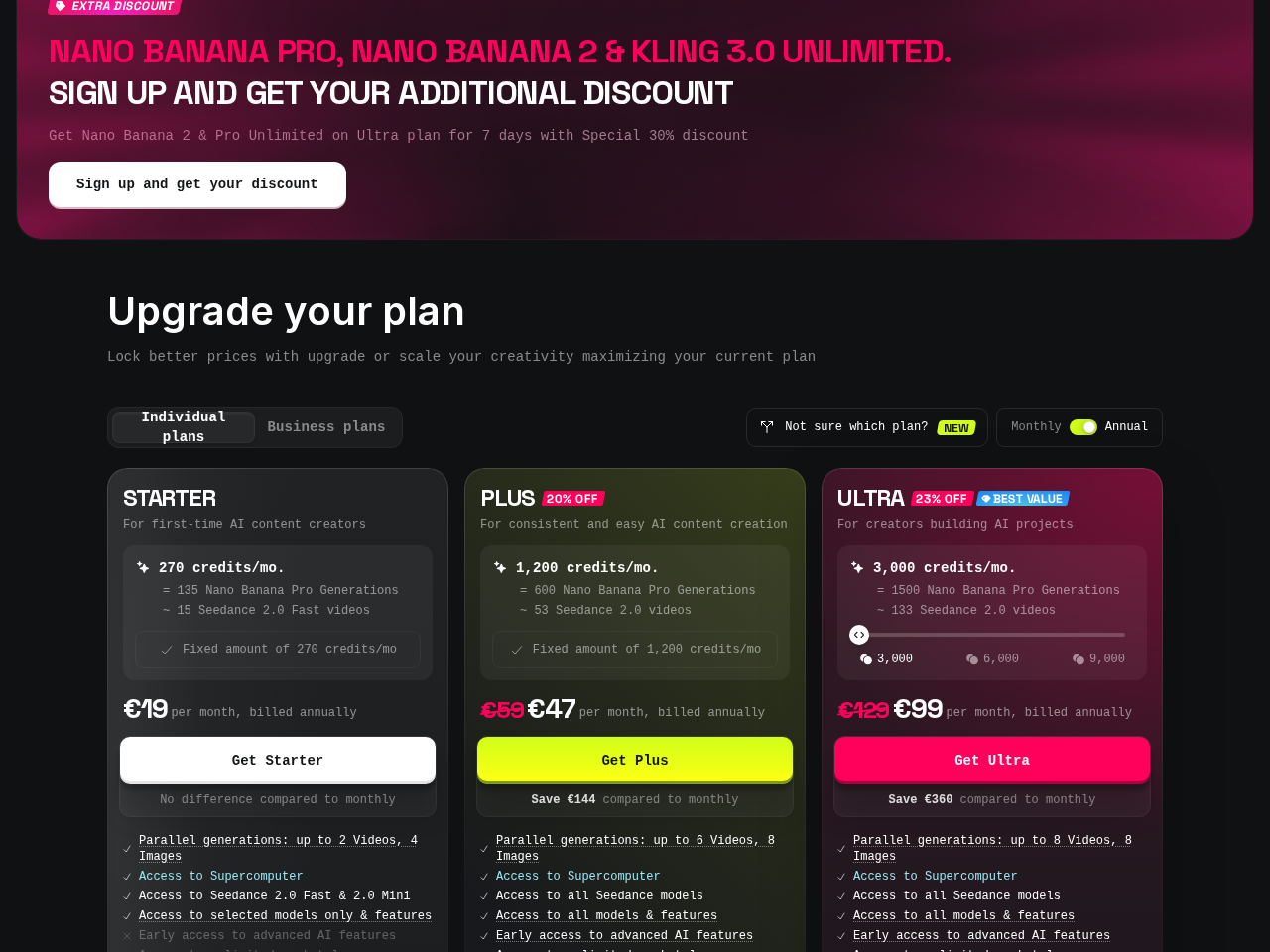 And it's a paid platform: plans run €19 (Starter) / €47 (Plus) / €99 (Ultra) per month.
My take: Higgsfield is for people already on the platform who want the best-looking skin and can tolerate re-rolling for likeness. It's not the tool I'd send someone to when they just want their face on a photo or clip.
Remaker: the most natural free swap — until you check the resolution
Remaker is the one that surprised me, because in a head-to-head where someone tried three tools to put their face on GIFs, Remaker came out as "the most natural face swap" of the bunch. Natural is the hardest thing to get right — most swaps read as "obviously edited" — so leading on naturalness is a real compliment.
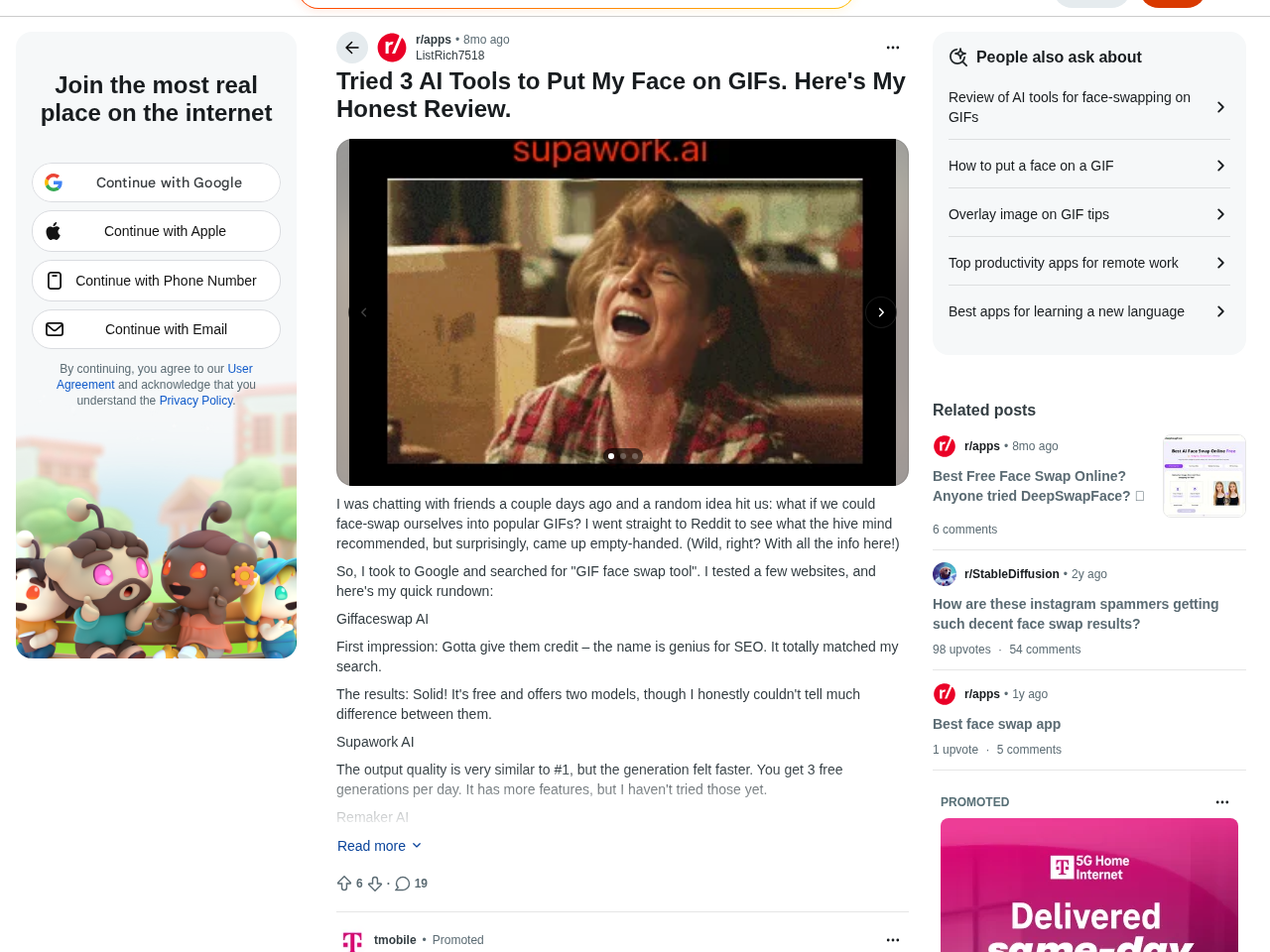 The r/apps hands-on review that crowned Remaker the most natural free swap — and flagged its low-res free output.
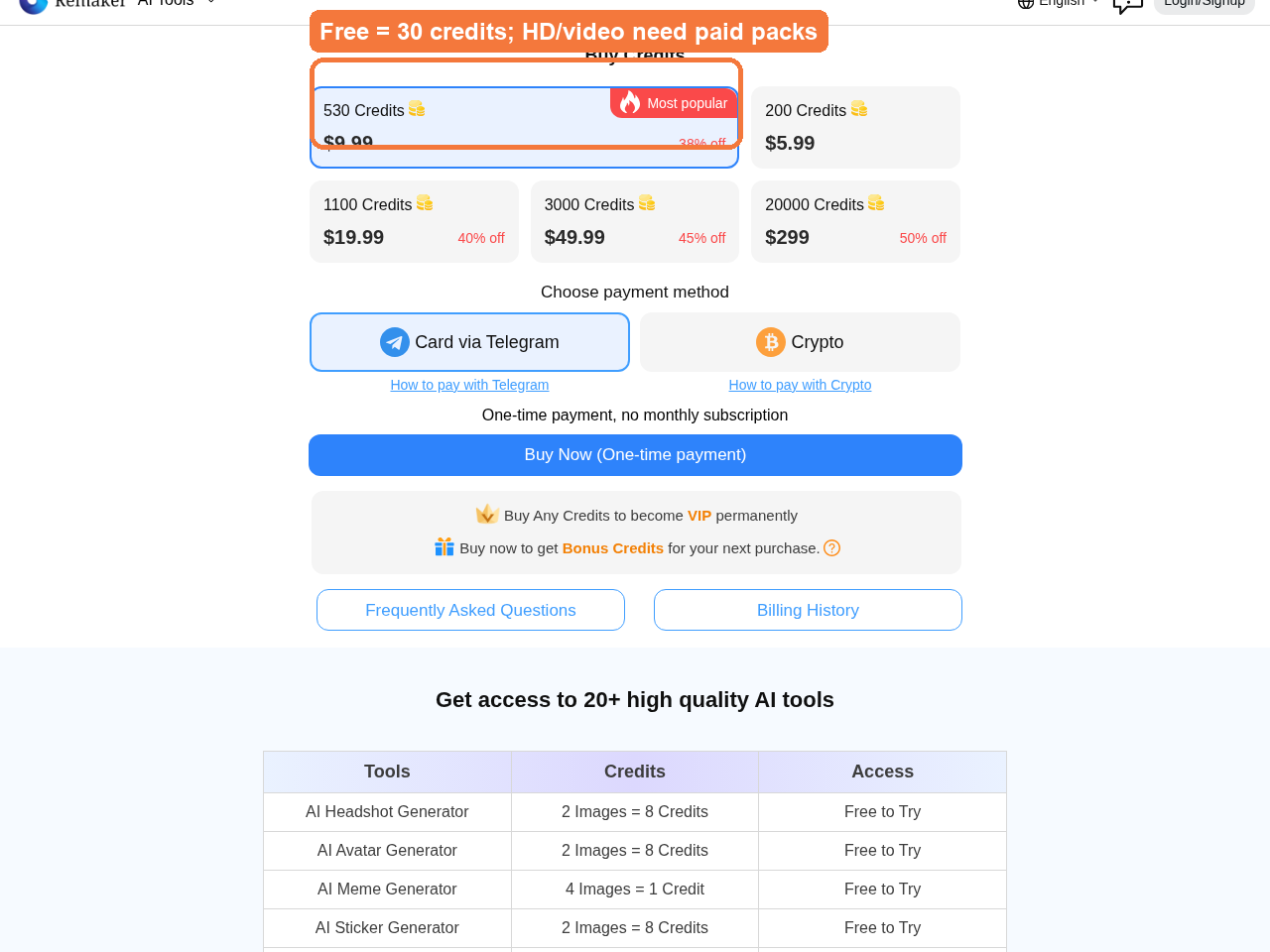 Remaker sells one-time credit packs (530 credits for $9.99 is the "most popular"), and HD output sits behind its paid VIP tier.
Then comes the asterisk, from the same reviewer: "the free version's output is pretty low-res. They have an HD option, but it need to update as VIP." So the naturalness you're admiring is happening at a resolution that won't hold up if you zoom in or post it large, and the fix — HD — is a paid upgrade. It's the classic freemium shape: the free tier is good enough to make you want more, and "more" is behind Remaker's VIP tier. Video follows the same pattern — in a separate walkthrough, the takeaway on tools like this was that for videos you have to upgrade to a paid plan.
Remaker's free credits (30, at roughly 1 credit per single-face swap and 2 for multi-face) also mean you're metering yourself from the start, and you need an account to get them. None of that makes it bad — the naturalness is real. It just means "free Remaker" and "the Remaker results that impressed you" aren't always the same thing.
My take: Remaker is the pick if natural-looking output is your top priority and you're willing to pay for HD once you're hooked. Judge it knowing the free version is the soft-focus demo, not the finished product.
The one caveat that matters more than any brand
Here's the thing almost no comparison tells you, and it reframes this entire debate. When one reviewer ran roughly ten free web tools side by side, the verdict was deflating: these tools "produced pretty much all the exact same results… I would give pretty much all these platforms a skip." The reason is that a lot of free web swappers — the aifaceswap.io-style "free, no login" tools included — are quietly built on the same aging swap engine. Different brand, different landing page, near-identical output.
What this means practically: past a certain point, you're not choosing between engines, you're choosing between wrappers. And if the engine is shared, the biggest lever you control isn't the brand — it's the source image. A sharp, well-lit, front-facing reference face will beat a fancier-sounding tool fed a bad photo every single time. Similar face shapes swap more cleanly; mismatched lighting and extreme angles are what make results look "off." That's genuinely good news, because it means you can get pro-looking results from a free tool if you nail the input. We put together a full checklist on getting clean, natural face-swap photos that walks through exactly which reference shots to feed it.
It's also worth a warning on the paid end: the community is littered with reports of subscription swappers where "most sites with a subscription are total scams," delivering a handful of videos for $30–$50. So don't assume paying automatically buys you quality — often it just buys you a login.
The verdict: pick by need
There's no single winner here, because these three aren't solving the same problem. Match the tool to what you actually want:
- You just want a fast, free swap with zero hassle → Aiface Swap. No sign-up, no watermark, photo and video, 3 swaps an hour. It's the one that respects your time.
- You want the most realistic skin texture and you're already on a generative platform → Higgsfield. Accept the login, the credits, and the likeness re-rolls as the cost of that texture.
- You want the most natural-looking free result and will pay for HD later → Remaker. Just remember the free tier is low-res and video is a paid upgrade.
- You care about output quality above all → forget the brand and fix your source image. A clean reference beats tool-hopping, because many of these share one engine anyway.
For most people asking "which face swap should I use," the honest answer is: start free, start frictionless, and only pay once a specific limitation (HD, resolution, likeness) actually blocks you. Test all three on the same reference photo if you can — you'll usually find the gap between them is smaller than their marketing suggests, and the gap between a good input and a bad one is much larger.
Try Aiface Swap free — no sign-up, no watermark
If you want to skip the login walls and paywalled HD and just see a clean swap right now, that's exactly what we built Aiface Swap for. It's free, needs no account, adds no watermark, and does photo, video, and GIF with automatic face detection — 3 swaps every hour, with your uploads auto-deleted after 24 hours and an API waiting if you outgrow the free tier. Feed it a sharp, well-lit reference photo (the single biggest quality lever, as we covered above) and see how far frictionless gets you. Open Aiface Swap and run your first swap — then decide if any of the others are worth the sign-up.