
If you searched for "free unlimited AI face swap for video," I've got bad news and good news. The bad news: almost every online plan selling you the word "unlimited" is lying, and I'll show you the receipts. The good news: there's exactly one genuinely uncapped route, plus a couple of honest free online tools that'll cover most people without the setup headache. Let me save you the trial-and-error.
Key takeaways
- "Unlimited" online is mostly a myth. Practitioners report subscription face-swap sites are "total scams" and that plans get quietly gutted after you pay — so don't build a workflow on a promise that evaporates on the next billing cycle.
- The only truly uncapped route is local open source. FaceFusion (installed via Pinokio) runs on your own GPU with no per-clip limit — but it costs you setup time and hardware, and browser-based cousins like Roop and Visomaster cap clips at 60 seconds.
- Honest free online tools have clear, stated limits — a few swaps an hour or a handful a day, short video caps, or watermarks — and that's fine for most jobs.
- The smart play is a hybrid: use a frictionless free online tool like Aiface Swap for quick photo and short-video swaps, and only stand up a local rig when you genuinely need long, uncapped video.
The "unlimited" myth
Here's the thing nobody selling you a subscription wants to admit: "unlimited AI face swap" is almost always marketing, not a feature. On any online service, every render burns real GPU time that costs the provider money. So the economics only work one of two ways — they cap you, or they lose money until they cap you.
And they do cap you. Community reports are blunt about it: most sites with a subscription are "total scams… maybe 10 videos if you're lucky", and they'll happily charge $30 to $50 a month for that privilege. Even the plans that don't outright scam you tend to get hollowed out over time. One user in that same thread documented a supposedly "unlimited" tier that got quietly slashed to "5 videos of 720p and maybe 10-15 videos of 480p," with refreshes throttled to once every 24 hours. That's the pattern: the word "unlimited" gets you in the door, then the fine print — or a silent update — takes it back.
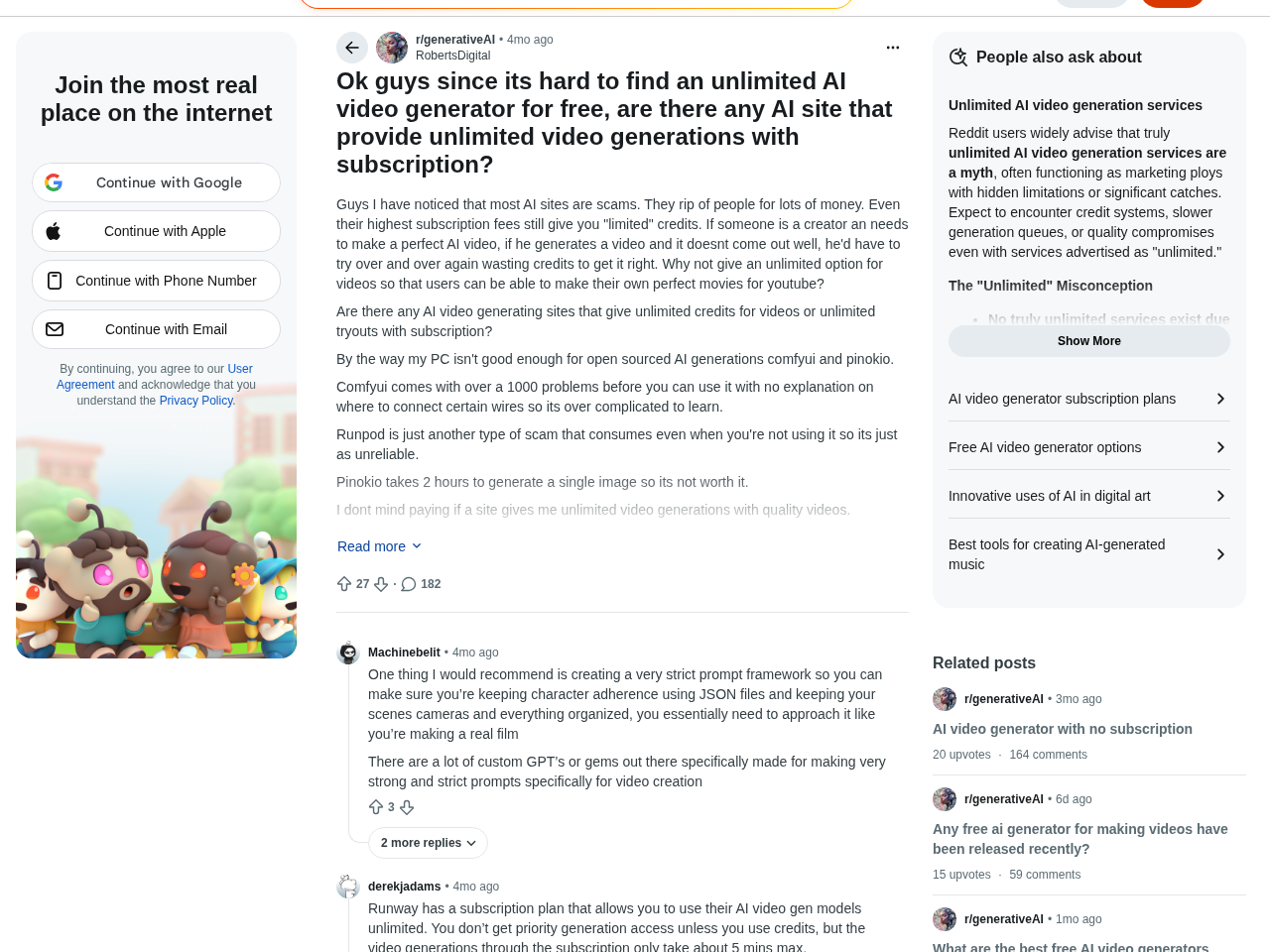 The r/generativeAI thread where practitioners lay out exactly how "unlimited" plans ration you in practice.
It's worth understanding why this keeps happening, because it tells you what to trust. A cloud service is renting expensive GPUs by the minute; every render you fire off is a direct cost to them. "Unlimited" and "we pay per render" can't both be true forever, so the moment a heavy user shows up, the provider has to choke throughput, drop resolution, or ban the account — usually without warning. That's not a bug in the business model, it's the whole business model. Which is exactly why the durable free options aren't the ones promising the moon; they're the ones that either state a modest, honest cap up front or push the compute cost onto your own hardware.
So when you see "unlimited" on a pricing page, mentally translate it to "capped at a number we haven't told you yet." The only real question is whether that cap is honest and generous, or hidden and stingy.
What's genuinely unlimited: local open source
There is one route where "unlimited" is literally true, and it's the one the hype cycle keeps burying: run the model on your own machine. As one practitioner put it, if you really want unlimited, "your only real option is renting a powerful GPU and running open-source stuff… setup is a pain and not beginner-friendly." That's the honest trade: no per-clip cap, no monthly bill, no watermark — in exchange for setup time and a GPU.
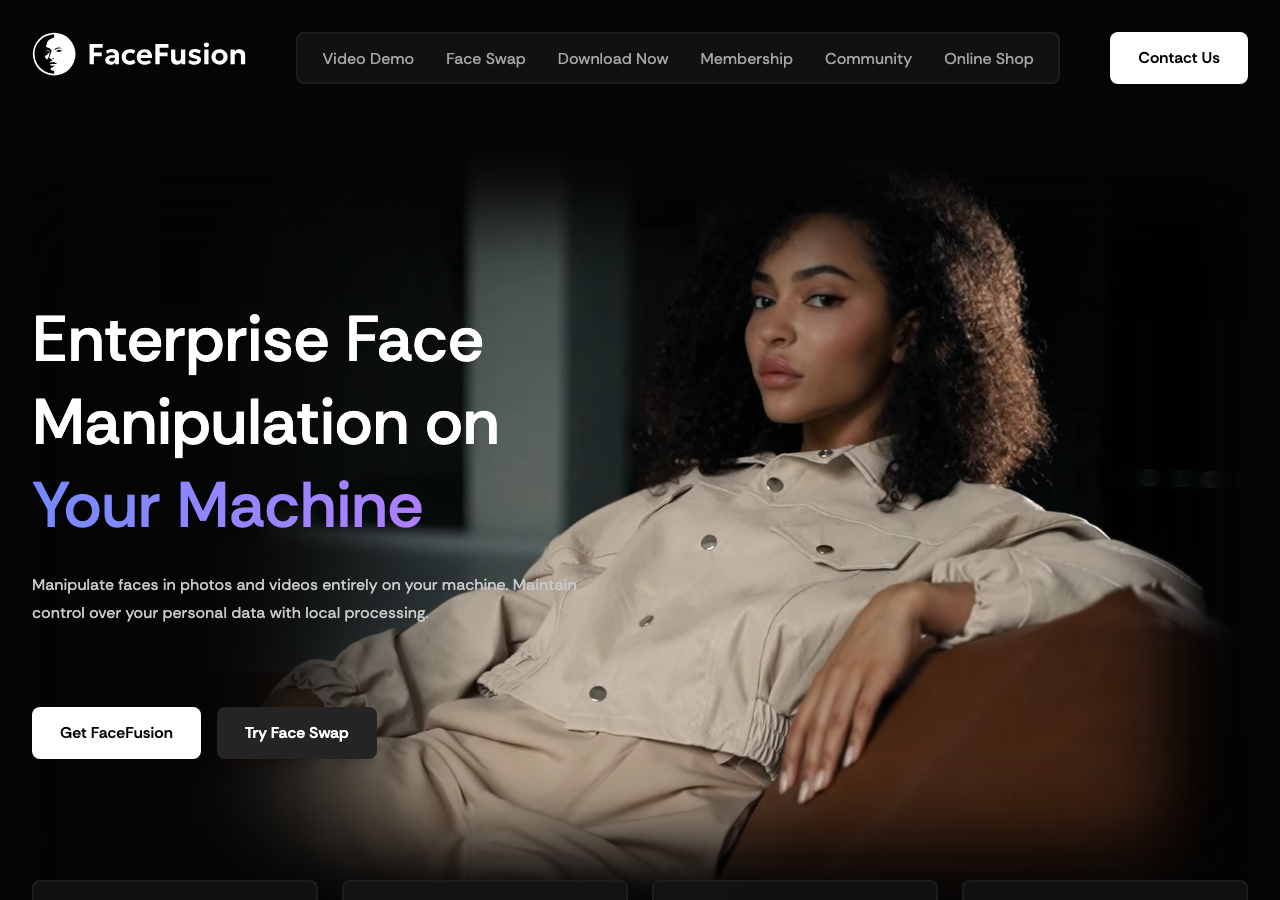
The most approachable option here is FaceFusion. The easiest way in is Pinokio — open Discover, find FaceFusion 3, hit Install, run the default, and you get the UI with no command-line wrangling. As that walkthrough sums it up, "because the program is free and without limits, it's definitely worth it." That's the whole appeal: your card, your clips, your rules. (If you want a plain-English primer before installing, facefusion.pro breaks down what the tool does and how to set it up.)
Two important caveats before you get excited. First, not every "local" tool is actually uncapped — the popular browser-adjacent options Roop and Visomaster both limit clips to 60 seconds, so if long-form video is the goal, FaceFusion is the one to target. Second, "free" doesn't mean "fast" or "no hardware." The FaceFusion docs list 8GB of VRAM as the minimum and 12GB+ as recommended, and on a modest 8GB card, renders crawl — one creator clocked roughly 6-7 minutes of processing per single second of video. Unlimited, yes. Instant, no. If your machine is under that 8GB floor, the render either crashes on you or crawls to the point of being useless — so be honest about your hardware before you commit a weekend to it.
The settings that separate "obviously AI" from "clean"
If you do go local, the defaults will disappoint you, and that's why people write FaceFusion off too early. A few changes do most of the work.
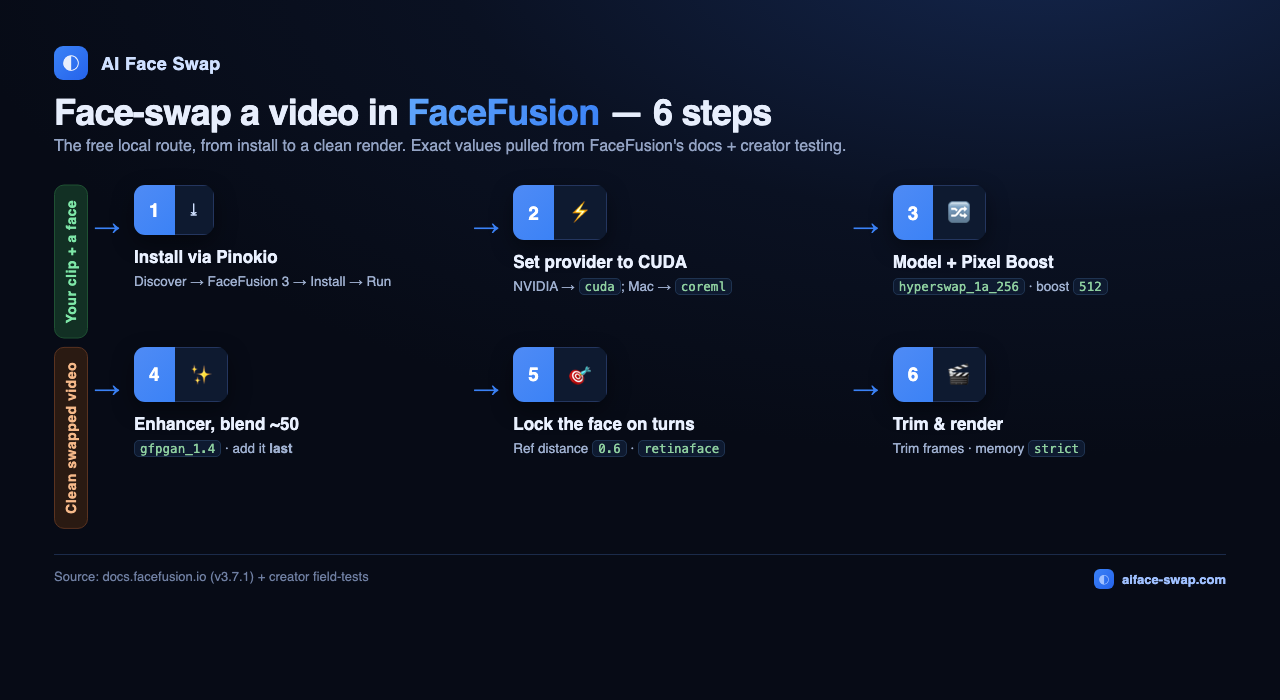
Start with the execution provider: on an NVIDIA card you absolutely must select CUDA instead of leaving it on Auto — it's the difference between hours saved and hours wasted. From that same testing, bump the Reference Face Distance from 0.3 up toward 0.6 so the swap holds when the head turns, and switch the detector from yoloface to retinaface for hard angles. The single biggest quality lever, though, is Pixel Boost: the default 128 is what gives you that blurry, obviously-AI look, while pushing it to 256 or 512 brings out crisp, realistic detail in the eyes (go 1024 for tight close-ups). Finally, add the face enhancer (gfpgan_1.4) last in the chain and drop its blend from the default 80 to around 50 — leave it high and skin turns plasticky. The step-by-step above has the full set, and our free video face swap guide walks each one in detail.
For the clip itself, keep it simple: pick low-motion footage, swap only the frames where the face is clearly visible, and stitch. Eyes are the weirdest part, so low-difficulty movement gets you a much cleaner first pass.
Free online tools and their real limits
Not everyone wants to babysit a GPU. If you just need a swap done today, browser tools are the move — as long as you go in knowing the real ceiling. Here's the honest lay of the land, pulled from tool pages and hands-on testing:
| Tool | Real free limit | Sign-up? | Watermark? | Video? |
|---|---|---|---|---|
| Aiface Swap | 3 swaps/hour, no cap on total | No | None | Yes (+GIF) |
| Faceswapper.ai | 6 images/day (10 signed in) | Optional | Not stated | Yes |
| Facetool | Up to 24 images/day | Optional | Not stated | Yes |
| Akool | 50 signup credits (~4/image, 10 per 10-sec video) | Yes | Not stated | Yes |
| VidMage | Video capped at 15 seconds, HD-max | Optional | Not stated | Yes |
| Magic Hour | Big watermark + 360p compression | Yes | Yes | Yes |
A few notes so the table doesn't mislead you. The daily quotas — Faceswapper's 6/day, Facetool's 24/day, and Akool's credit math — are per-account, so they reset but don't stack; Akool hands out 50 signup credits and charges four per image or ten per 10-second video, which burns fast. VidMage's free tier tops out at 15-second clips, with 5-minute 4K locked behind $9.99/month. And Magic Hour, while free, slaps on a big watermark and compresses everything down to 360p — fine for a laugh, useless for anything you'd actually post.
One more warning from the same broad test: a lot of these free web tools quietly share the same aging swap engine, so they spit out near-identical fuzzy results. The reviewer's verdict after running about ten of them was to "give pretty much all these platforms a skip." Translation — don't judge free online swapping by the worst of the pack. The tools worth your time are the ones that state their limits plainly and don't degrade your output to upsell you.
That's exactly where I'd point you first. For a full rundown of which browser options are actually worth opening, see our guide to the best free AI face swap tools.
The smartest free workflow
Here's how I'd actually run this, and it's a hybrid — because chasing a single "unlimited" tool is the mistake.
For photos and short clips, start online. Ninety percent of face-swap jobs are a headshot, a meme, a GIF, or a clip under a minute. For those, spinning up a GPU is wildly overkill. Grab a frictionless free tool, get your result in seconds, and move on. This is where a no-sign-up, no-watermark option earns its keep — you're not creating an account or cleaning up a watermark for a ten-second job.
For long, uncapped, or commercial video, go local. The moment you need to swap a five-minute video, batch dozens of clips, or iterate without watching a credit counter, that's your cue to stand up FaceFusion. The setup tax is real, but it's a one-time cost that buys you genuine "unlimited." Walk through it once with our step-by-step guide to face swapping video with AI and you'll have a rig you never pay for again.
Whatever you pick, respect the fundamentals. Similar face shapes swap far better than mismatched ones — two very different head shapes look wonky no matter the tool. Feed good references, keep lighting consistent, favor close-ups and low-motion footage, and let a face restorer clean up the fine detail. The tool matters less than the inputs.
The takeaway: stop hunting for a mythical unlimited online plan. Use honest free online tools for the everyday stuff, and reach for local open source only when you truly need uncapped video. That combo is free, sustainable, and doesn't depend on a pricing page that might get gutted next month.
Try a genuinely free online swap — no sign-up, no watermark
If you want the frictionless side of that workflow, Aiface Swap is where I'd start. It's free with no sign-up and zero watermarks, handles photos, video, and GIFs with automatic face detection, and its limit is refreshingly honest: 3 swaps an hour, with no cap on how many you do overall — a clearly stated ceiling instead of a fake "unlimited" that quietly shrinks. Uploads are auto-deleted after 24 hours, there's an API when you need volume, and it's rated 4.9/5 on Product Hunt with 100M+ images generated for 500K+ creators.
Do your quick jobs there in seconds, keep FaceFusion in your back pocket for the long uncapped renders, and you've got the only "free unlimited" setup that actually holds up. Not sure which online tool fits your job? Compare them in our best free AI face swap tools roundup, or jump straight into the video how-to — then swap a face for free at aiface-swap.com.